
Thredbo Team Info Hub
This section contains a range of resources for Thredbo Team Members. If you have questions please reach out to the People & Culture Team located in the Valley Terminal Admin Office, via email: [email protected] or call us on 02 6459 4186.
Team Member Perks
As a Thredbo team member, you are eligible for a Thredbo Staff Season Pass* to gain access to the mountain, gym, tennis courts, golf course, and loads of discounted products in Thredbo. A donation of $10 for each season pass is payable when you redeem your Thredbo Staff Season Pass. This contribution will be paid to the EVT charity program.
Once you have accepted your contract and completed the onboarding process you can claim your pass.
How to claim your Thredbo Staff Season Pass:
- Log into your Online Shop Account
- Once logged in, select the ‘I’m Looking For’ drop-down tab to access Team Member Perks.
- Add products to your cart and complete the checkout process.
- Add a passport style picture to your Online Shop Account
- Collect your Staff Pass from any MyThredbo Card Kiosk located at Valley Terminal or Friday Flat.
*Terms and Conditions apply for eligibility to the Team Member Perks.
The mountain is yours to explore on your days off! Enjoy unlimited riding and lift access this summer. In addition to your Thredbo Team Member Season Pass, you’ll enjoy amazing summer perks, including:
- Discounted Bike Rentals – up to 70% off Enduro and Downhill bike rental. See details below.
- MTB Clinics – Save up to 70% on 2 Hour MTB clinics!
- Scenic Lift Access (offered during the summer operating period)
- MTB lift access (offered during the summer operating period)
- Save up to 20% on Entry for Cannonball MTB Festival
- Save up to 60% Women’s Ride Days
- Discounted Learn to Swim Programs
See the Team Member Perks page for details and how to book (Click to Access)
Team Member Summer Bike Rentals
Enjoy up to 70% off Enduro and Downhill bike rentals, including a full-face helmet and body armour.
70% off: Norco Shore Park, Aurum A7 & Sight
30% off: Specialized Status & Stumpjumper 15
*Blackout dates apply during peak holiday periods.
Please Note: Perks and initiatives are reviewed each season and may change. They’re offered during the summer operating period and are not guaranteed. Full terms and conditions are available via the Conditions & Application Forms section on this page.
Please Note: Blackout dates apply during peak holiday periods, but you’ll be able to score these savings for most of the season.
The mountain is yours to explore on your days off! Enjoy unlimited riding and lift access this winter.
In addition to your Season Pass, you’ll enjoy amazing winter perks, including:
- Winter 2026 Perks – Stay tuned for more exciting offers coming soon!
- Winter Transport Initiatives – Making Your Commute Easier
(Full details and application process will be shared closer to opening day) - Discounted Seasonal Programs – Eligible team members can enjoy 50% off children’s seasonal programs for their dependents.
*Eligibility Criteria and Terms & Conditions apply
Please note: Perks and initiatives are reviewed each season and may change. They’re offered during the winter operating period and are not guaranteed. Full terms and conditions are available via the Conditions & Application Forms section on this page.
Get up to 50% OFF Lift Passes for Your Friends & Family!
Share the fun and save big with exclusive discounts on 1 to 7 day lift passes.
Choose from these great options:
☀ Summer: MTB Adventure Pass or Scenic Adventure Pass
❄ Winter: Winter Lift Pass, Winter Adventure Pass or Merits/Gondola Pass
How to Redeem
You can redeem for your friends and family or simply email them the voucher so they can book their own passes.
- Log in to your Online Shop Account
- Go to your profile name/account and from the drop-down menu, select ‘Vouchers’.
- Choose one of the following options:
Email – Send the voucher details to friends or family so they can book their own passes
Redeem – Access the voucher details yourself.
Full terms and conditions are available via the Conditions & Application Forms section on this page.
We’re proud to support eligible team members with passes for their partners and dependent children, so your family can experience the magic of Thredbo right alongside you.
Eligibility depends on your employment type and ongoing criteria. Forms need to be updated each season or when family details change.
It’s our way of saying thank you and helping you create unforgettable family moments on the mountain!
Full terms and conditions are available via the Conditions & Application Forms section on this page.
Joining our team means you are part of EVT, one of Australia and New Zealand’s leading experience companies.
You can enjoy a wide range of perks, check them out here – EVT Elevate Perks
To start enjoying your Elevate Perks, you’ll need an Elevate Perks Card, which is stored in your team member Cinebuzz account on the Event Cinemas app or website.
How to log into your team member Cinebuzz account:
- Head to the Event Cinemas website or open the Event Cinemas app.
- Click on the Cinebuzz tab.
- Enter your EVT email/username (format: [email protected]) as your Username.
- Watch the “Sign in with Microsoft” button appear
- Follow the steps to log in with your Microsoft authenticator!
If you run into issues using your EVT One Login, let your manager know, so they can log a ticket with the correct IT Support channel.
More of a visual person? Watch a step-by-step video on Viva (Click to Watch)
Need help? Reach out to your manager or email [email protected].
Winter 2025 Seasonal Rentals – More Info Here
Make the most of your winter season for less with our exclusive Thredbo Team Rental & Retails deals.
See below the great seasonal rental deals that you can book and pay for via the Team member Perks Tab in your Online Shop Account
Rental items can be collected from Friday Flat Renal Shop from 12pm Friday 6th June.
Team Member Seasonal Sport Rental – $315
- Ski Package = Skis/Boots/Poles
- Board Package = Board/Bindings/Boots
We have a beginner option and and intermediate option so please let the rental team know your riding level
Seasonal Sport Rental for Child of Team Member – $155
- Ski Package = Skis/Boots/Poles
- Board Package = Board/Bindings/Boots
Stay safe and enjoy Thredbo’s subsidised helmet program.
Collection from Valley Terminal Retail Store. More Info Here
Staff subsidised helmets:
- Giro Neo with MIPS – $120
- Giro Ledge with MIPS – $70
Thredbo Staff Boot Deals – More Info Here
We have a large selection of waterproof winter boots in both our Valley Terminal and Friday Flat Thredbo Retail stores, the below styles are recommended for outdoor roles that stand in the snow all day.
Winter Groups Lessons
Team members receive 1 x Complimentary First Timer lesson. You must redeem your staff pass before booking a lesson.
How to Book:
- Log in to your Online Shop Account
- To redeem navigate to ‘My Account’ and click on ‘Vouchers’
- You will find your Complimentary lesson voucher here
Unlimited Level 2-6 lessons are available for $20 per lesson.
How to Book:
- Log in to your Online Shop Account
- Once you have logged in, select the “I’m Looking For” drop down tab and select “Team Member Perks”
- Scroll down to find the “Group Lesson” staff offer
Blackout dates: 5th July to 20th July.
Bring a Friend Vouchers – 50% off 1 to 7 day Lift Pass
- Choose to either redeem for your friends and family or email the voucher to them, so they can book their own passes
- To redeem navigate to ‘My Account’ and click on ‘Vouchers’
- Terms & Conditions Apply
If you are having any issues with logging in or are unable to access this offer, please contact the Guest Services Team.
We pride ourselves in being Daymakers, going above and beyond to create the best experience for our guests. Through Viva Engage, you can acknowledge a team member for going the extra mile and being a #Daymaker for guests and colleagues.
Our Daymakers could win themselves a fresh set of skis, snowboards, outerwear & more!
Head to viva Engage and give a team member a #Daymaker shoutout.
Find everything you need to apply and review the terms here:
Team Member Perks – Terms & Conditions (Click to View)
Family Benefits – Application Form (Click to Apply)
Tips to Complete Your Offer
If you are successful in joining us as a Thredbo Team Member here are some tips to help you accept your offer of employment.
Part 1 – Accepting Your Offer
Check your inbox for an email from your hiring manager (subject line includes “…offer of employment”) and follow the prompts to accept.
Part 2 – Onboarding to the Thredbo Team
Once you’ve accepted your offer, keep an eye out for your Welcome to Dayforce email – this is where your onboarding begins!
Tip: Complete your onboarding tasks on a desktop or use the desktop version of Dayforce in your mobile browser. The Dayforce App doesn’t support onboarding tasks.
Below is a guide to help you through the process.
Step 1 – Log in to Dayforce for the First Time
Open your welcome email and click ‘Activate Your Account’.
Verify your identity (last 4 digits of your mobile).
Create your new password and log in using:
Company: evtelevate
Username: Found in your Welcome email (becomes your Employee ID)
Password: The one you just created
Complete the remaining setup steps.
Already verified?
Log in using this link: https://dayforce.evt.com and sign in using Option 2.
Login Options
Option 1: EVT One Login (Single Sign On (SSO))
Use EVT One Login, which requires Microsoft Authenticator to be set up.
Option 2: Dayforce Username & Password
Available to all users; just enter your details and you’re in.
Need help? Email [email protected].
Step 2 – Complete Your Onboarding Forms
There are five sections to complete. Each will show a green tick and say ‘Submitted’ when finished:
1. Emergency Contact – Who to contact in case of emergency
2. Employment Forms Australia – TFN, Super Choice, Direct Deposit, Employee Contribution. For more in depth information regarding these requirements see ‘Important Information for International Team Members’.
TFN Declaration Form
If you don’t have a TFN, you can select ‘I have made a separate application/enquiry…’ and make sure to let us know your TFN number once you have one.
Superannuation Standard Choice
If you don’t have a super fund, you can select ‘My employer’s default super fund’ or set one up and come back and complete this form.
Direct Deposit
You’ll need an Australian bank account. If you don’t have these details yet, complete the other sections first.
Employee Contribution
The contribution is optional. If you wish to skip, select ‘Skip this form’ or the section will remain incomplete.
3. People Policies – Acknowledge EVT policies
4. Personal Information – Name, gender, etc.
5. Thredbo Policies – Acknowledge Thredbo policies
Once all five steps are completed, you have completed the Dayforce section of onboarding!
Employee Checklist: Optional but recommended – upload any required certificates (e.g., RSA) here. All certificates must be processed through Dayforce.
Part 3 – Check Work Rights
You’ll receive a separate email from CheckWorkRights with the subject line: Action Needed: Complete your checks with CheckWorkRights.
This email includes a link to the CheckWorkRights platform. Follow the link to provide proof of your work rights.
Didn’t receive the email? contact [email protected].
Returning team members must complete this step even if previously done.
The easiest way to log in is through a web browser on your phone or computer using this link: https://dayforce.evt.com.
Login Options
Option 1: EVT One Login (Single Sign On (SSO))
Use EVT One Login, which requires Microsoft Authenticator to be set up.
Option 2: Dayforce Username & Password Recommended
Available to all users; just enter your details and you’re in.
Using the Dayforce App
The app is handy for quick checks, but keep in mind its features are limited and can’t do everything the browser can.
You’ll be able to access your Dayforce profile in the app once:
- Your contract is fully completed, and
- Your start date has passed.
Tip: We recommend signing in using your Username and Password rather than the Continue with SSO option.
Helpful Suggestions
- Bookmark the login link for easy access.
- If you’re using EVT One Login, make sure Microsoft Authenticator is installed and linked.
- For the smoothest experience, use Chrome or another modern browser.
Got a question? Reach out to [email protected]
Once you’ve accepted your contract, you can download a copy using one of these methods:
Option 1: Through Dayforce via desktop or mobile web browser
- Log in to Dayforce
- Tap or click the Menu icon (☰) in the top-left corner.
- Select Profile from the menu.
- Go to the Personal tab and choose Letters from the dropdown.
- Your contract will be listed there – click to download.
Option 2: From Your Offer Email
- Simply use the link in your original Offer of Employment email to open your contract directly – then click to download.
As an international team member, you may find that you cannot complete your contract, as you do not have either a bank account or tax file number. Please read below to see what to do if this occurs.
Bank Details
If you get to the bank account stage of your contract and do not have an Australian bank account, it is okay to pause at this stage of your contract. We require an Australian bank account for you to proceed.
There are some banks that will allow you to open an account before you arrive in Australia and provide ID to complete the set up once you’re in the country. You can choose to look online if your preferred bank offers this, otherwise you can stay at this stage until you are in Australia and able to open an account.
Please note that you will not be able to commence employment until your bank account information is received, so it is important to complete this information before your first rostered shift. We suggest that you plan for a day or two to organise all of this before arriving for work.
Tax File Number
Tax File Numbers can only be applied for once you arrive in Australia. However, you can complete the TFN section in your contract prior to arrival. When asked for your TFN in question 1, select: “I have made a separate application/enquiry to the ATO”.
When you arrive in Australia you can apply for a TFN. For more information about tax, applying for a TFN and how to provide it to us please see the Tax section
You have 28 days from your contract start date to provide your TFN.
How to I find out my tax status (an Australian resident for tax purpose or a foreign resident for tax purposes or a working holiday maker)
Everyone is different and there are various factors that determine your personal tax status. If you have any questions about your tax status contact the Australian Taxation Office (ATO). Their website is: https://www.ato.gov.au/
Superannuation Requirements
All team members are required to have a superannuation fund (often abbreviated to ‘super fund’ or ‘super’). In Australia the superannuation system is the main way most people save for their retirement. To find out more about super visit the below website: HERE
Types of Funds:
Default Funds:
Thredbo has three default funds. If you select “My employer’s default super fund: I want my employer to open a new account for me in their default fund” a fund will be opened on your behalf with one of the following three funds:
- Australian Superannuation
- Hostplus
- Care super
Pre-existing Super Fund
You can compare option and pick your own choice of superannuation fund. To compare options and choose a super fund that meets your needs you can visit the ATO website: https://www.ato.gov.au/
Self-Managed Super Fund
You can set up a self Managed super fund, please ensure you provide all necessary details during your onboarding.
I selected for my employer to create a super account with their default fund. Where can I find my super fund account details?
Your super fund name and account number can be found on your payslip in the bottom left-hand corner. Once you have these details you can contact the super fund directly and get the remainder of your super account details.
Tax File Number
Each employee has 28 days from their contract start date (not your first shift) to supply a tax file number otherwise they will be charged the highest tax rate by the Australia Taxation Office.
How to I find out my tax status or Tax File Number (an Australian resident for tax purpose or a foreign resident for tax purposes or a working holiday maker)
Everyone is different and there are various factors that determine your personal tax status. If you have any questions about your tax status contact the Australian Taxation Office (ATO). Their website is: https://www.ato.gov.au/
You can find your Tax File Number by logging into your My Gov Account. The website is: https://my.gov.au/
Superannuation Requirements
All team members are required to have a superannuation fund (often abbreviated to ‘super fund’ or ‘super’).
Types of Funds:
Default Funds:
Thredbo has three default funds. If you select “My employer’s default super fund: I want my employer to open a new account for me in their default fund” a fund will be opened on your behalf with one of the following three funds:
- Australian Superannuation
- Hostplus
- Care super
Pre-existing Super Fund
If you are already a member of a superannuation fund you can supply this information during onboarding, or anytime via submitting an ATO Super Choice Form to the P&C team.
Self-Managed Super Fund
If you have a self Managed super fund, please ensure you provide all necessary details during your onboarding.
I selected for my employer to create a super account with their default fund. Where can I find my super fund account details?
Your super fund name and account number can be found on your payslip in the bottom left-hand corner. Once you have these details you can contact the super fund directly and get the remainder of your super account details.
If you need to supply or update your bank details, tax file number or superannuation fund, these can be completed via Dayforce Forms.
To see the steps on how to update these details in Dayforce please check out this document.
If you need any assistance, please contact the People & Culture team or drop by the People & Culture office.
You can find us in the Valley Terminal building. See here for our People and Culture location.
Winter operating hours: Monday to Sunday 8:30 am – 4:30 pm
Summer operating hours: Monday to Friday: 8:30 am – 4:30 pm
Email: [email protected]
Phone: 02 6459 4186
Some Thredbo team members are required to serve alcohol as part of their role, so Responsible Service of Alcohol (RSA) training is mandatory if this applies to you.
How to Enrol for an RSA Course
If you need to obtain an RSA certificate for your position, use the link provided to learn about the requirements and how to enrol in an RSA course (Follow this link).
If You Completed Your RSA Interstate
If you have moved permanently to NSW:
You must complete the RSA Bridging Course to work in NSW, even if you completed an RSA interstate within the past five years.
If you are not permanently relocating to NSW:
You can work using your approved interstate RSA (completed within the last five years), provided you understand your responsibilities under NSW liquor laws. In this case, the bridging course is not required.
Uploading your RSA and Other Certificates to Dayforce
If your role requires RSA, you’ll need to upload your RSA details into Dayforce.
Using the Dayforce App
- Log in to the app.
- Tap ‘Forms’ in the bottom menu.
- Choose Upload New Certificate and submit once completed.
Using a Desktop or Web Browser (mobile or desktop)
- Log in and click ‘Profile’ under Quick Links.
- Select ‘Forms’ from the tabs menu.
- Choose Upload New Certificate and submit once completed.
Helpful Hint: Make sure your RSA certificate is saved as a clear PDF or image file before uploading
Some Thredbo team members work closely with children and must have a valid NSW Working with Children Check (WWCC).
If your role requires this, you’ll be asked to provide your WWCC number before you commence you first day of work.
The following teams generally require a WWCC for some roles:
- Mountain Biking
- Snowsports
- Thredbo Leisure Centre
- Patrol
- Guest Services
- Marketing
Not sure if you need one?
Reach out to your hiring manager – they’ll confirm and assist you.
How to Apply for a WWCC
There are two stages, and both must be completed before your first shift:
Stage 1 – Online Application
- Complete the online application (Click to Apply)
You will need to enter 4 identification documents as part of your application. - Once submitted, you’ll receive an Application (APP) number by email
Stage 2 – In-Person Verification
- Visit a Service NSW location with your application number and original ID
- Complete verification within 28 days (or your APP number will expire)
- Pay the service fee.
- You’ll receive a confirmation email with your WWCC (usually within 48 hours).
- Send your WWCC number to your manager.
Service NSW Locations
Service NSW centres are only in NSW and open Monday to Friday (excluding public holidays).
The closest centre to Thredbo & Jindabyne is in Cooma.
Find a Service NSW location (Click to Search)
Not in NSW or Australia?
If you’re not in NSW or Australia, you can complete Stage 1 online from anywhere. Once you arrive in NSW, finish Stage 2 in person. If your application number expires, simply reapply and provide the new number.
Plan Ahead
If your role requires a WWCC, make sure you plan your travel so you can complete both stages before your first shift.
If your position requires a WWCC, you cannot commence work until your onboarding is complete and your WWCC has been provided and verified.
Pay, Rosters, Training and Communication
Dayforce is your go-to platform for managing your personal details, exploring EVT career opportunities, completing learning modules and accessing your payslips.
To help you navigate the platform, check out the cheat sheets below!
How to log in?
You can log in using the Dayforce app or by visiting dayforce.evt.com.
Enter the following details:
-
- Company: EVTElevate
- Username: Your employee ID
- Password: The password you created
If you are unable to log in, please reach out to [email protected] for assistance.
You’ll complete your training in Dayforce, and using a desktop is the smoothest way to go, but any web browser (on mobile or desktop) will work.
Steps to Get Started
- Log in to Dayforce
- On the home page, look for Quick Links or tap/click the Menu icon (☰) in the top-left corner.
- Select Learning.
- Head to My Courses and Learning Plans. This is where your assigned training is found.
-
Teams will be your all-in-one place to chat, collaborate, and celebrate including access to Viva!
-
You’ll use your EVT One Login with Microsoft Authenticator to securely access Teams, one app for all communications.
- Chat: Quick messaging for one-on-one or in groups (replacing Workplace Chat)
- Channels: Organised spaces for team planning, collaborating, and file sharing
- Viva: Celebrate moments, and connect with company news (replacing Workplace)
- Download Microsoft Authenticator and Teams apps
- Look out for your EVT One Login email from EVT Elevate where your temporary password will be valid for 14 days
- Follow the steps to log in and get started
-
Already have access to Teams? You don’t need to do a thing but get on Viva!
See the below links for some tips to get you started:
Getting Started with Viva and Teams
Emplive is our rostering system at Thredbo. You can login to Emplive via your internet browser or you can download the app for free from the Google Play Store or the Apple Store.
How to set up Emplive:
After you have completed your onboarding you will receive an email with your login details. The email will have a temporary password active for 24 hours.
If you miss this or the original email, please request a new one from EVT Payroll by sending them an email at [email protected] – make sure to include your full name and Employee ID.
How to Login:
- Link to Emplive platform: https://ess.emplivecloud.com/SignInEL20.aspx
- Your username: Employees 6-digitID@thredbo (For example: 123456@thredbo)
- Your password: The password that was chosen by you
How to reset your password/forgotten password
- Select the ‘forgotten password’ option on the login page
- Enter your username
- You will receive an email from [email protected] with the subject line ‘ESS Reset Password Link’
- You will have 24 hours to follow the link and create a new password
Emplive How to Guides
- How to log in to Emplive
- How to access your roster using Emplive on a desktop
- How to access your roster using the Emplive app
- How to add unavailability using Emplive on a desktop
- How to add unavailability using Emplive app
- How to apply for leave using Emplive on desktop
- How to apply for leave using Emplive app
How to see your Snowsports instructor schedule
Flaik is our Snowsports Instructor scheduling system. This is where you submit your season availability, see your schedule, sign up for training clinics and more!
**Please note that the start date on your contract is not necessarily your first day at work. Please refer to Flaik to confirm the date of your first shift for work/training.
You can log in to Flaik via your internet browser. The Flaik user guide is a great source of further information.
Flaik’s Snowsports Certifications
You can view a list of Flaik’s certifications here.
How to log in:
You will receive an invite via email from Flaik with login information.
- Link to Flaik platform: https://thredbo.flaik.com/guest/login
- Your Username: Your nominated email address
- Your Password: The password chosen by you. Password must be at least six characters long and include at least one number
How to reset your password or forgotten password?
- If you get an error saying username or password incorrect – please click on the forgot your password link above the login button to reset your password.
- Flaik will ask you to enter your email address. This address does not need to be the one associated to your Flaik account.
- Click send, complete the verification and a confirmation should appear.
Employee ID
You will be issued an Employee ID once your onboarding is complete. This will be emailed to you from the People & Culture Team at Thredbo.
If you need help or can’t find the original email please reach out and we can send you your employee ID.
Returning Team members:
Team Members receive a new employee ID each time they are re-hired. The Employee ID is your profile per employment.
It allows you to log in and access your pay history.
The Alpine Resort Award (ARA) is our way of recognising and celebrating the best in managing and running alpine resorts, focusing on outstanding guest experiences, environmental practices, and overall resort excellence.
Link to FairWorks ARA : https://library.fairwork.gov.au/award/?krn=MA000092
Follow the link to find more details on:
- Coverage: The scope and who the award applies to.
- Key Provisions: Details about pay rates, working conditions, and entitlements.
- Modern Award: The legal framework and conditions relevant to retail industry employees.
- Updates and Amendments: Information on any recent changes or updates to the award.
Team Member Support
You can find us in the Valley Terminal building. See here for our People and Culture location.
Email: [email protected]
Phone: 02 6459 4186
Winter operating hours: Monday to Sunday 8:30 am – 4:30 pm
Summer operating hours: Monday to Friday: 8:30 am – 4:30 pm
Here is a map of the Thredbo Village and what is available.
Should I get health insurance?
We strongly recommend all team members obtain ambulance cover (available through your health fund or travel insurance) before arriving in Thredbo.
An ambulance ride could set you back thousands of dollars to get to the nearest hospital.
Ambulance cover can be purchased for less than $50 a week from various private health funds and is well worth the additional expense.
Interstate Team Members:
If you already have ambulance cover, but are not from NSW, please check the conditions of the cover for NSW on your policy.
International Travellers:
It is very important to have some health cover while you are in Australia as it can be costly for International team members who are not eligible for Australian Medicare. Make sure to review your travel insurance for ambulance and hospital cover.


Team Accommodation
Team accommodation is offered to eligible team members.
During the application process you will be asked if you require accommodation, please ensure you answer this correctly. If invited for an interview, the hiring manager will then discuss accommodation options further.
If you are offered a position and accommodation, our People & Culture team will contact you within 7 days of your contract offer to inform you of the accommodation process. If you haven’t heard from us within 7 days, please reach out to your hiring manager to confirm your team accommodation status.
As we are unable to guarantee team accommodation, we encourage you to explore private options in the area. For the Winter season, many options become available between late February and early May, and we recommend reaching out early to local real estate agents, as well as checking with friends and seasonal connections.
Where is team accommodation located?
- Winter team accommodation is based in and around Thredbo, Jindabyne, Tyrolean, and East Jindabyne.
- Summer team accommodation is based in Thredbo Village.
How much does it cost?
- Before checking in, you will need to pay a $100 admin fee and a $500 security deposit.
- Included in the cost of accommodation is a weekly allowance for utilities.
- Your rent will be deducted from your pay at the end of each week.
- We also recommend having a little spare cash upon arrival as you will need to pay 7 nights rent upfront at check in. You may also have to outlay purchases of linen, doona, pillow etc if coming from interstate or overseas.
Rent Costs per person per week
- Summer 25/26 rates:
- Thredbo: $217
- Winter 2026 rates:
- Jindabyne: $259
- Thredbo 3 person share: $217
- Thredbo: $273
Do I have to share accommodation?
Yes, team accommodation is on a shared basis (i.e. more than 1 person per room) in a self-contained apartment, dormitory, or lodge style accommodation.
Can I choose who I live with?
You may request to share a room with your partner or friend, and we will do our best to accommodate any requests, but it cannot be guaranteed. If not sharing with a partner, you will be roomed with a person of the same gender. You will be able request who you wish to share with when you book your check in appointment time. Family or friends that are not employed by Kosciuszko Thredbo cannot be accommodated.
When can I move in?
- Once you have paid your admin fee and security deposit you will be sent an email with information about how to book a check in appointment.
- You can check into accommodation up to 3 days before your first scheduled day of work. Your first day of work may not be the same as the start date on your contract. Please wait until your manager has confirmed the date of your first shift before booking your check in time.
- Winter: Check in is available 7 days a week in both Thredbo and Jindabyne.
- Summer: Check in is available in Thredbo Monday – Friday 8.30am – 4.30pm
What do I need to Bring?
- Pillows, Doona, Sheets, Linen, Blankets, and Covers. (for hygiene reasons these items are not supplied)
- Mattress Protector
- Bath towels, bath mat and tea-towels
Bed Sizes:
- Single person: Bring bedding for a king single size as this will cover you for any size of bed.
- Couple: Bring king-sized bedding as this will cover you for any size of bed.
What else is provided?
Due to having a variety of properties supplied by various owners, we are unable to provide a detailed list of all items within each location. However, accommodation comes with a basic kitchen including a fridge, oven, cutlery, crockery, cooking utensils and a lounge area plus heating.
Team Accommodation Maintenance
Follow this LINK to report a maintenance issue.
For anything urgent please call 0264594186.
- Winter operating hours: Monday to Sunday 8:30am – 4:30pm
- Summer operating hours: Monday to Friday: 8:30am – 4:30pm
Gas Information
If your property requires gas.
It is your responsibility to familiarise yourself with the location of the gas tanks and regularly check if they require replacement (see attached gas information help sheet how to).
All properties have two gas tanks, once the first is empty, email [email protected] to order a new gas bottle.
Deliveries only occur once a week and can take up to 7 days to arrive.
Electricity
Familiarize yourself with the location of your electricity switchboard/breaker box.
Common issues needing your electrical breakers a reset:
- Overloaded power sockets or power boards
- Faulty appliance
Keys
- Replacement keys are not available after hours. You are responsible for maintaining possession of your key. People & Culture can provide keys for accommodation during business hours only (8.30am-4.30pm).
- If a key is lost, replacement will incur a fee of $25.
Other Helpful guides for living in team accommodation
Thredbo Check In
- Location: Valley Terminal, Thredbo Village, NSW 2625 – MAP
- Operating Hours:
- Summer: 8:30 am – 4:30 pm, Monday to Friday
- Winter: 8:30 am – 4:30 pm, 7 days a week
- Booking: Required and only available if you are checking into a Thredbo property.
Jindabyne Check In
- Location: Jindabyne (full details will be provided in your communication emails)
- Operating Hours: Winter only – 9:00 AM to 4:00 PM, 7 days a week
- Booking: Required. Access will be provided in May to those offered accommodation.
You will need to follow the below process to check out of accommodation:
- Notify People & Culture
Email [email protected] to notify us of your planned departure date and check out location. - Clean the property
Complete a thorough clean using the checklist provided in your email. This applies even if other tenants remain. Your housemates will be asked to confirm your contribution. - Remove Belongings
Take all personal items and food with you. - Return Keys
On your departure day, visit one of the following locations:- People & Culture Office – Valley Terminal Reception (Mon–Fri, 8:30am–4:30pm)
- Thredbo Alpine Hotel Drop Box – Front Office Reception (24/7)
At the drop-off point:- Use the QR code on the drop box to complete the online check-out form.
- Place your keys in the provided envelope.
- If keys are lost, note this on the form (a lost key fee will apply).
Important: Failure to return keys on the same day as check-out will result in rent being deducted until keys are returned.
There are plenty of opportunities for private accommodation during winter, summer, or year-round. Below are some helpful links to assist you in finding a place that suits your needs.
Local Real Estate Agencies
If you’re looking for something more permanent or seasonal, these local agencies can help:
Belle Property (formerly Henley Property)
Social Networking Groups
Community groups are a great way to find shared housing or short-term rentals:
Facebook: Thredbo Notice Board
Facebook: Looking to Live Around Jindabyne
Transport and Parking
If you are bringing a car down to Thredbo, we have designated parking areas for both day visits and overnight parking.
Please see Thredbo’s parking locations here.
Application form – 2025 Access Pass Application Form
Please provide this completed form when attending the National Parks Office.
Thredbo is located within the Kosciuszko National Park and all cars travelling to Thredbo must have a valid National Parks Vehicle Entry Pass. As a Thredbo team member you are eligible to receive a discounted Kosciuszko National Park Staff Pass. Your Staff Pass allows you to access and park within Thredbo Village.
Application Process
To purchase your Kosciuszko National Park Staff Access Pass your name will be on a list at the Snowy Region Visitors Centre (49 Kosciuszko Rd Jindabyne) and at the Alpine Way Visitor Entrance Station.
Visit one of these locations with your car registration documents, a completed application form (a blank form can be found in the section above) and once they confirm you as an employee on the list, they will issue you with a pass for $38.
Please also note that if the car registration is not in your name you will need proof that your name is on the insurance from the owner of the vehicle.
The Staff Pass is only valid for Thredbo within the Kosciuszko National Park. If you’d like access to other areas within the National Park you may be required to purchase a non-staff pass at full price.
Winter Public Bus Service
During winter the Snowy Mountains Bus Service runs every 30 minutes during peak and is the most affordable and stress-free way to get to and from Jindabyne.
- Jindabyne to/from Thredbo (via Skitube)
- Jindabyne to/from Perisher
- Cooma to/from Jindabyne (via Berridale)
- Station Resort to East Jindabyne and Tyrolean Village via Snowy Region Visitor Centre
The service will operate from 7th June to 5th October, 7 days a week from 6AM to 6PM.
For more information, please check out the links below:
Plus check out the travel incentives under team member perks for more winter options.
Other Transport Options
Over winter, there are multiple public transport services to Jindabyne and Thredbo starting on the 8th June (exact date may vary).
Please plan your trip early and account for any closures on weekends and the public holidays, e.g. Monday 10th June (exact date may vary).
Below are some bus services and helpful websites that operate from Sydney, Canberra and Melbourne:
Greyhound Bus Service: https://www.greyhound.com.au/buses/snow-express
Murray Coach and Bus Service: https://www.murrays.com.au/express-services/
Transport NSW: https://transportnsw.info/
Rome 2 Rio: https://www.rome2rio.com/
Summer Staff Bus Service
There are staff buses that operate from Jindabyne to Thredbo during summer for a $10.00 weekly wage deduction. There are limited seats available with 3 different services to sign up to from October long weekend to early June.
- Jindabyne – Thredbo Service 1 Mon – Fri
- Jindabyne – Thredbo Service 2 Mon – Fri
- Berridale via Jindabyne to Thredbo Service – Ask for timetable
Transport NSW have a SMS alert system in place where everyone has the opportunity to opt into a service that provides SMS updates on road conditions and road updates with closures and re-openings.
This will greatly assist you and effectively help with travel plans up and down Thredbo.
To subscribe, click here: https://nswroads.work/sms-alert
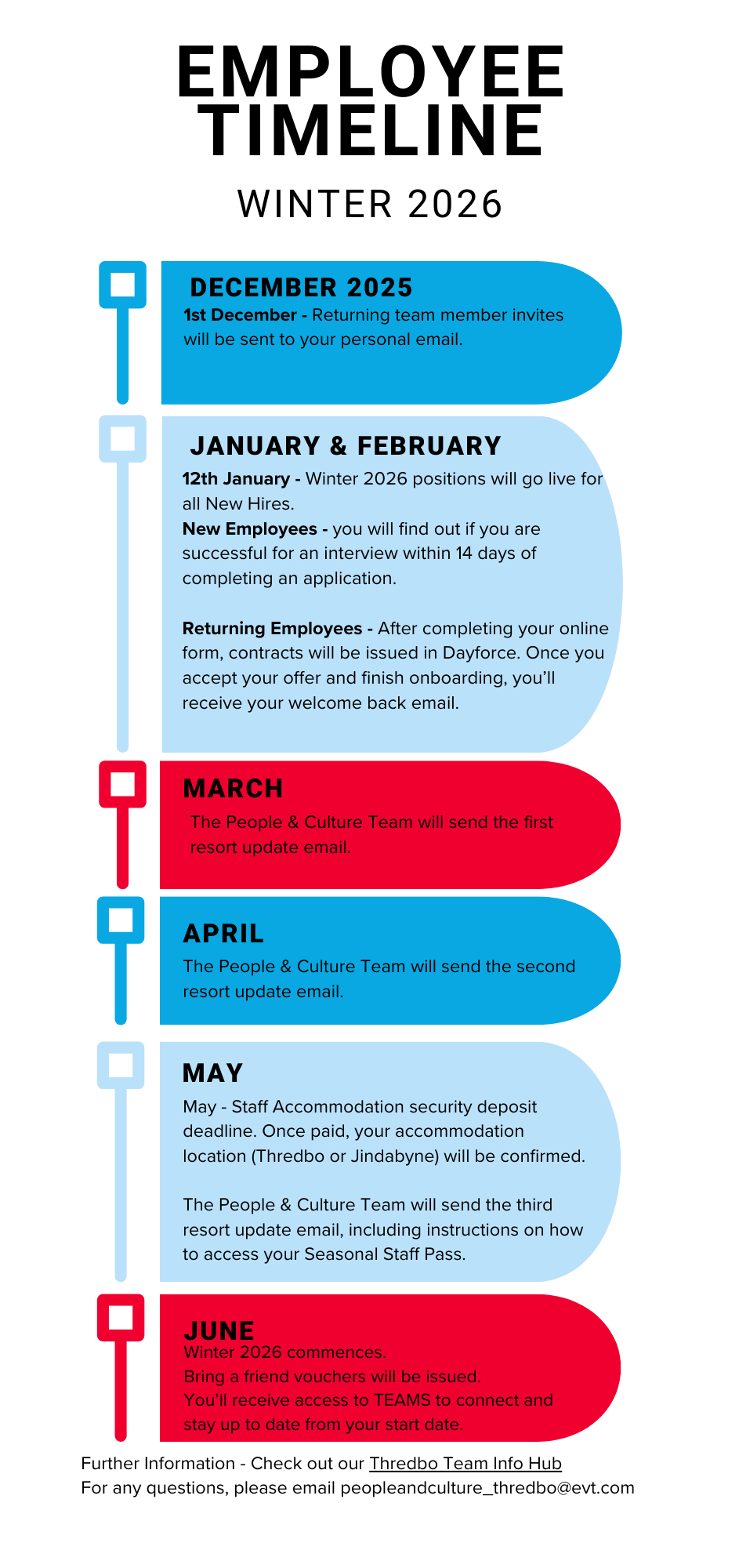
Winter Recruitment Timeline
Whether you ski, snowboard, hike, mountain bike or are visiting for the first time, our app is your companion to Australia’s Premier Adventure Destination.



Sign up for news
Subscribe to our newsletter to receive deals, the latest weather, forecasts, news, events and more!
Thredbo sits on the traditional land of the Monero – Ngarigo people who have looked after this land, water and community for over 60,000 years. We thank them for all they have done and continue to do to look after their country, a special place which we all love and respect.